
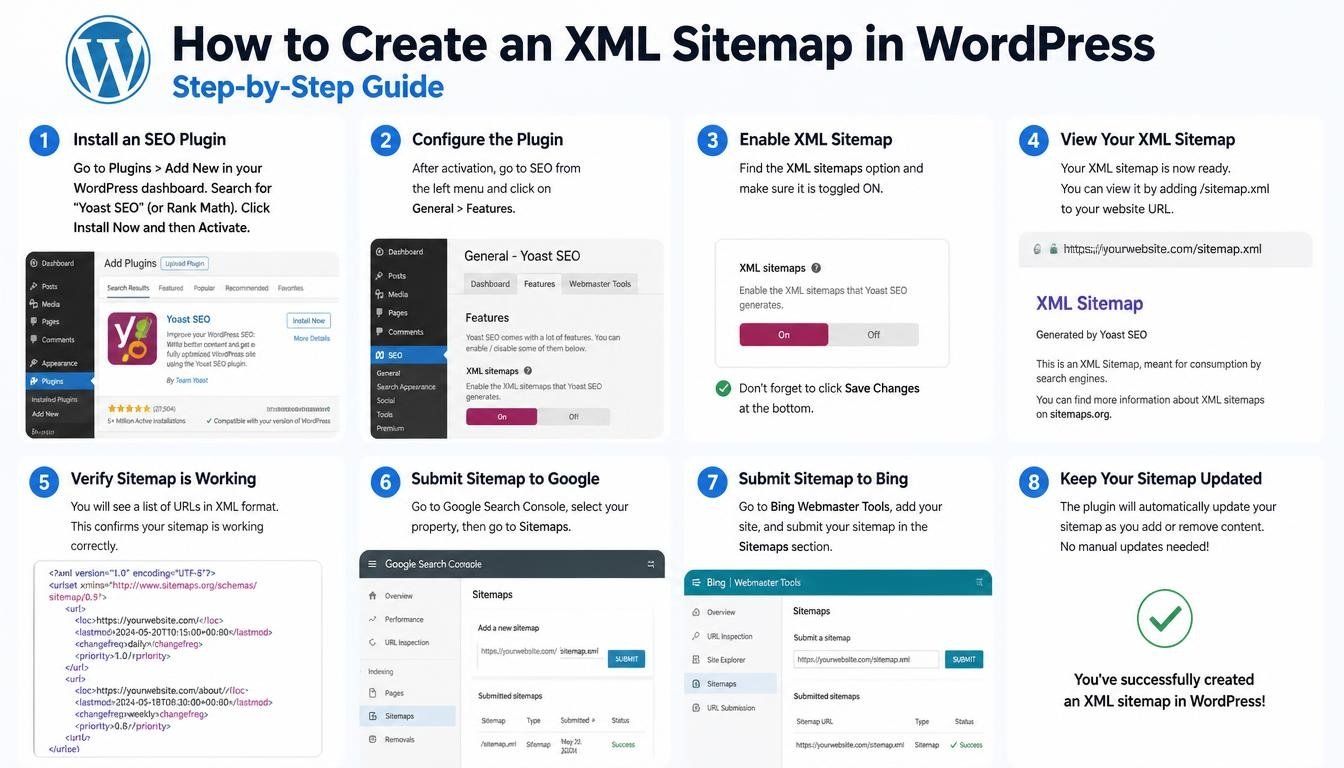
An XML sitemap helps search engines discover important pages and posts on your website. If you run a WordPress website, creating and checking your sitemap is a useful step in your SEO setup.
In this guide, you will learn how to find your WordPress XML sitemap, check it using Rank Math SEO, and submit it to Google Search Console.
What Is an XML Sitemap?
An XML sitemap is a file that lists URLs you want search engines to discover. It can help search engines understand which pages and posts are available on your website.
For example, a sitemap may include your homepage, blog posts, and important pages.
A sitemap does not guarantee that Google will index every URL. Your pages should also be useful, accessible, and suitable for search results.
Why Is an XML Sitemap Important for WordPress SEO?
An XML sitemap can help search engines discover your website’s important URLs, especially when your website is new or has few external links.
It is useful because it can:
- Help search engines discover published pages and posts.
- Provide a list of important URLs on your website.
- Support the discovery of new content.
- Help you identify which URLs your sitemap contains.
However, a sitemap is only one part of SEO. Helpful content, internal links, website accessibility, and a good user experience are also important.
Does WordPress Automatically Create a Sitemap?
Yes. Modern WordPress versions include a basic XML sitemap feature. If you use Rank Math SEO, the plugin can also generate a sitemap for your website.
You generally do not need to install another sitemap plugin just to create a sitemap.
Using multiple plugins that generate overlapping sitemaps may create unnecessary confusion, so check your current setup first.
How to Find Your WordPress XML Sitemap
Follow these steps to check your sitemap.
- Open your web browser.
- Visit
https://blogflyingwrg.com/sitemap_index.xml. - Check whether an XML sitemap index appears.
- Open the individual sitemap links listed on the page.
- Confirm that the URLs belong to your website and that the sitemap loads without an error.
If the URL does not open, check your SEO plugin’s sitemap settings and your website configuration before making further changes.
How to Check Sitemap Settings in Rank Math
Rank Math SEO includes a sitemap generator that can manage your sitemap automatically.
Follow these steps:
- Log in to your WordPress dashboard.
- Open Rank Math SEO.
- Select Sitemap Settings.
- Confirm that the sitemap feature is enabled.
- Review the available post type settings.
- Make sure the content types you want search engines to discover are included.
- Save any changes you make.
The exact options may vary depending on your Rank Math version and website setup.
How to Submit Your Sitemap to Google Search Console
After confirming that your sitemap works, you can submit it to Google Search Console.
- Open Google Search Console.
- Select the correct property for your website.
- Open the Sitemaps report.
- Enter
sitemap_index.xmlin the sitemap field if your website uses this Rank Math sitemap index. - Click Submit.
- Review the status shown in the report.
If Search Console reports an error, check the sitemap URL and make sure Google can access it.
Submitting a sitemap helps Google discover URLs, but it does not guarantee that those URLs will be crawled or indexed.
Common XML Sitemap Problems and Solutions
1. Sitemap Page Does Not Open
Check that Rank Math’s sitemap feature is enabled. Also review any caching, security, or permalink settings that could affect access.
2. Sitemap Submitted but URLs Are Not Indexed
A submitted sitemap does not guarantee indexing. Use the URL Inspection tool in Google Search Console to check individual URLs and review any reported indexing issues.
3. Important Posts Are Missing
Review your sitemap settings and confirm that the relevant post type is included. Also check whether the post is published and accessible to search engines.
4. Multiple Sitemap Plugins Are Active
Check whether more than one plugin is generating or managing sitemaps. Keep your configuration clear and avoid unnecessary overlapping tools.
Frequently Asked Questions
What is the sitemap URL for WordPress?
A common Rank Math sitemap index URL is https://blogflyingwrg.com/sitemap_index.xml. Confirm that this URL works on your own website.
Do I need a separate sitemap plugin with Rank Math?
Usually not. Rank Math includes a sitemap generator, so a separate plugin is generally unnecessary just for sitemap creation.
Does submitting a sitemap improve Google rankings?
A sitemap can help Google discover URLs, but submission does not directly guarantee higher rankings or indexing.
How often should I submit my sitemap?
You normally submit your sitemap once and keep it accessible. Your sitemap generator updates it as your content changes; you do not need to resubmit it after every new article.
Conclusion
Creating and checking an XML sitemap is a practical part of WordPress SEO. With Rank Math SEO, you can generate a sitemap, verify that it works, and submit it through Google Search Console.
After completing these steps, focus on publishing useful content, adding relevant internal links, and monitoring your website’s indexing status.
Next step: Open your sitemap and Google Search Console to confirm that everything is working correctly before moving on to your next SEO task.